Screen Printing
Ordant can help companies that use screen-printing processes automate sales, , estimating, customer service, prepress, online ordering, shipping, invoicing, and data reporting.
Independently Powerful, Unstoppable Together
No matter what products your business produces with screen printing presses or pad printing systems, Ordant can consolidate and integrate the customer and job data needed.
The powerful, customizable modules in Ordant’s easy-to-use, cloud-based software work independently but integrate seamlessly. Start with one module to complement your existing business management software. Then add modules to maximize efficiency in other processes, such as job onboarding, estimating, customer relations, resource planning, inventory, or shipping. Together, Ordant’s tightly integrated business-information and e-commerce platform can help you constantly adapt to future shifts in your business.
Sales, Marketing & Services
Boost revenues by being more effective in pursuing new opportunities and communicating with customers and prospects.
Companies, Contacts, Prospects
Keep profiles of each company you serve as well as the decision makers and influencers within each company. Use information about prospective customers for more personalized marketing.
Opportunities and Estimates
Track the status of potential jobs. Quickly provide timely, customized estimates for single-item or multi-piece digital print jobs Keep the sales team focused on moving the best prospects from “opportunity” to “estimate” to “order.”
Marketing and Order Process Automation
Keep orders flowing to and through to your digital print business. Automatically send timely marketing and job-status messages to each customer and prospect. Drop approved job files directly into production press hot folders.Learn more
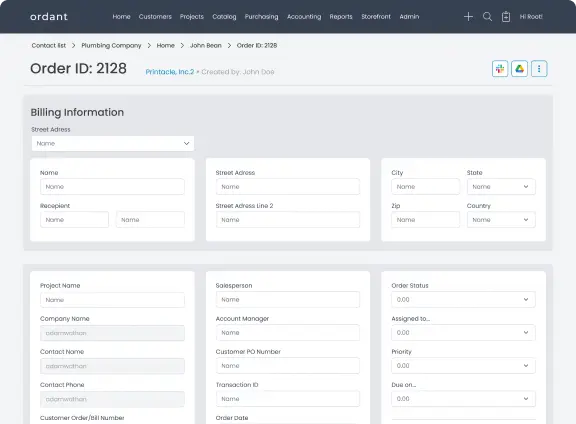
Job Onboarding
Details matter when new jobs are entered into your screen-printing workflow. Standardizing onboarding procedures minimizes data entry errors that occur when orders come in through a mix of emails, calls, and sales or customer-service rep notes
Web Portals for Online Order Submissions
Build web portals through which all customers can enter the job data themselves or verify the accuracy of the data before the job goes to prepress
Job Tracking Status
Follow the progress of every job, including preflighting, proof approvals, change orders, shipping, and invoicing
Digital Asset Management
Keep clients’ logos and other digital assets attached to their accounts for easy retrieval on future jobs.
Learn more
Prepress & Workflow
Ordant automation reduces the staff time required to preflight and proof each job file before making screens or sending job files to a digital printing device.
Simple Preflighting
Automatically scan customer-supplied files to detect file-preparation errors that might cause glitches when the job is screen printed. Reduce expensive rework.
Expedited Proof Approvals
Track the status of every proof created for every line item in an order. Automatically send reminders when everyone who must approve the proof hasn’t yet done so.
Hot Folders for Job-Ready Files
Approved print-ready files are automatically synced to hot folders in the workstations for your screen-making devices or digital printers.
Learn more
Inventory & Purchasing
Save time and money and prevent production delays by managing inventory levels and automatically replenishing supplies for upcoming jobs.
Purchase Orders
Monitor inventories of inks and other screen-printing supplies used most often. Set triggers to notify the purchasing manager when inventories fall below a certain level.
Quotes for Outsourced Work
While estimating a multi-item order, quickly get quotes from outsourcing partners.
Next-Quarter Plans
Analyze data from each customer’s order history to predict future orders. Estimate the types and quantities of materials that should be kept in stock..
Learn more
Shipping, Invoicing & Reporting
Ordant provides multiple options for delivering, billing, and processing payments for finished jobs. For example, ship all items in a multi-part order together or separately, depending on what the customer requires.
Pre-Determined Shipping Costs
Connect your FedEx and/or UPS account and choose the most economical shipping method for each job. Calculate shipping costs, taxes, and insurance to one or multiple locations.
Invoice Creation and Payment Tracking
Convert estimates to invoices as each line item is completed. Or, wait until all line items are done. Offer several online payment options and track past-due payments.
Data Gathering and Analysis
Use time, cost, and profit data from past jobs to refine your estimating and plans for future growth. Analyze your customers’ order histories to predict orders for upcoming months.
Learn more
Connect Ordant to

Slack

Google drive

FedEx

UPS

QuickBooks

Hubspot
Hundreds of customers trust Ordant to simplify their workflow
$1 Billion +
Quotes submitted
575,000 +
Orders processed
$600 Million +
Orders processed